最新资源





简介
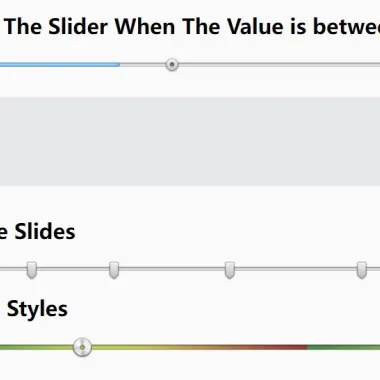
范围滑块是表示数量的好方法。它是一个图形控制元素,允许用户从连续范围中选择一个值。它是将一个连续值,如距离或大小,转换为一系列离散值,通常是数字。
它通常用作页面上的输入字段,用户需要从预定义的集合中选择一个或多个解决方案。它非常适合选择持续时间(例如轮班)、选择菜单中的食物、选择交通选项和其他具有预定义数量的东西。
Quinn是一个轻量级的jQuery插件,它提供了一种直接的方法来创建自定义的、支持触摸的渐进增强范围滑块,当JavaScript不可用时,该滑块会优雅地降级为标准范围输入。
滑块控件不仅允许单个值,还允许用户在两个/多个约束之间选择数值。
参见:
- JavaScript中的10个最佳范围滑块插件
如何使用它:
1.在文档中加载Quinn插件和其他所需资源。
<!-- Required -->
<script src="/path/to/cdn/jquery.min.js"></script>
<script src="/path/to/cdn/underscore-min.js"></script>

<!-- jQuery Quinn Plugin -->
<link rel="stylesheet" href="quinn.css" />
<script src="/path/to/jquery.quinn.min.js"></script>
2.初始化插件以生成基本范围滑块。
<div class="slider"></div>
$('.slider').quinn({
  // options here
});
3.或者在现有范围输入上初始化插件。
<input type="range" value="0" />
$('input[type=range]').quinn({
  // options here
});
4.使用改变回调。
$('.slider').quinn({
  change: function (newValue, slider) {
    console.log(newValue);
  }
});
5.将您自己的样式应用于滑块。
.slider {
  height: 5px;
}

.slider .bar .left, .slider .bar .main, .slider .bar .right,
.slider .active-bar .left, .slider .active-bar .main,
.slider .active-bar .right, .slider .handle {
  background-image: url(bg.png);
}

.slider .bar, .slider .bar .left, .slider .bar .main,
.slider .bar .right, .slider .active-bar .left,
.slider .active-bar .main, .slider .active-bar .right {
  height: 25px;
}

.slider .handle {
  height: 24px;
  width: 24px;
}
6.可用于自定义范围滑块的选项。
$('.slider').quinn({

  // minimum value
  min: 0,

  // maximum value
  max: 100,

  // If you wish the slider to be drawn so that it is wider than the
  // range of values which a user may select, supply the values as a
  // two-element array.
  drawTo: null,

  // step size
  step: 1,

  // initial value
  value: null,

  // Snaps the initial value to fit with the given "step" value. For
  // example, given a step of 0.1 and an initial value of 1.05, the
  // value will be changes to fit the step, and rounded to 1.1.
  //
  // Notes:
  //
  //  * Even with `strict` disabled, initial values which are outside
  //    the given `min` and `max` will still be changed to fit within
  //    the permitted range.
  //
  //  * The `strict` setting affects the *initial value only*.
  strict: true,

  // Restrics the values which may be chosen to those listed in the
  // `only` array.
  only: null,

  // Disables the slider when initialized so that a user may not change
  // it's value.
  disable: false,

  // By default, Quinn fades the opacity of the slider to 50% when
  // disabled, however this may not work perfectly with older Internet
  // Explorer versions when using transparent PNGs. Setting this to 1.0
  // will tell Quinn not to fade the slider when disabled.
  disabledOpacity: 0.5,

  // If using Quinn on an element which isn't attached to the DOM, the
  // library won't be able to determine it's width; supply it as a
  // number (in pixels).
  width: null,

  // If using Quinn on an element which isn't attached to the DOM, the
  // library won't be able to determine the width of the handle; suppl
  // it as a number (in pixels).
  handleWidth: null,

  // Enables a slightly delay after keyboard events, in case the user
  // presses the key multiple times in quick succession. False disables,
  // otherwise provide a integer indicating how many milliseconds to
  // wait.
  keyFloodWait: false,

  // When using animations (such as clicking on the bar), how long
  // should the duration be? Any jQuery effect duration value is
  // permitted.
  effectSpeed: 'fast',

  // Set to false to disable all animation on the slider.
  effects: true,

});
7.回调和函数。
$('.slider').quinn({

  // A callback which is run when changing the slider value. Additional
  // callbacks may be added with Quinn::on('drag').
  //
  // Arguments:
  //   number: the altered slider value
  //   Quinn:  the Quinn instance
  //
  drag: null,

  // Run after the user has finished making a change.
  //
  // Arguments:
  //   number: the new slider value
  //   Quinn:  the Quinn instance
  //
  change: null,

  // Run once after the slider has been constructed.
  //
  // Arguments:
  //   number: the current slider value
  //   Quinn:  the Quinn instance
  //
  setup: null,

  // An optional class which is used to render the Quinn DOM elements
  // and redraw them when the slider value is changed. This should be
  // the class; Quinn will create the instance, passing the wrapper
  // element and the options used when $(...).quinn() is called.
  //
  // Arguments:
  //   Quinn:  the Quinn instance
  //   object: the options passed to $.fn.quinn
  //
  renderer: Quinn.Renderer,

});
更新日志:
v1.2.2 (2022-05-24)
- 修复默认CSS中的句柄位置。
预览截图
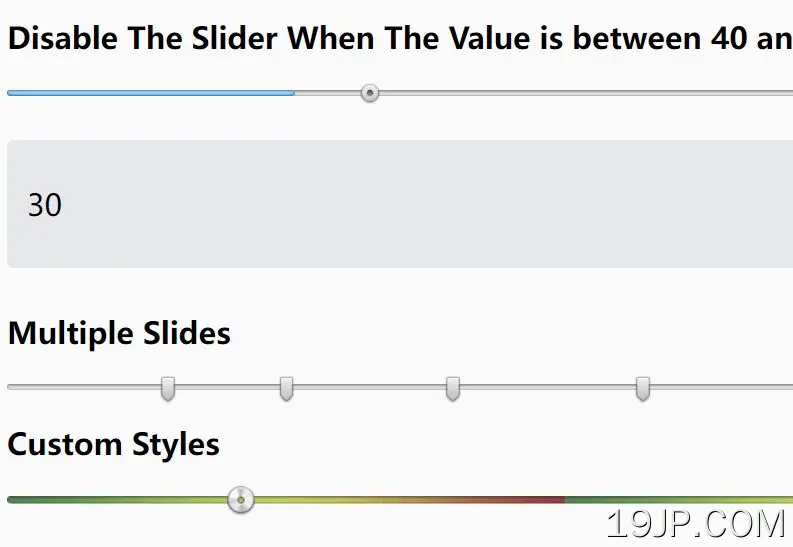 触控渐进增强范围滑块 jQuery Quinn