最新资源



简介
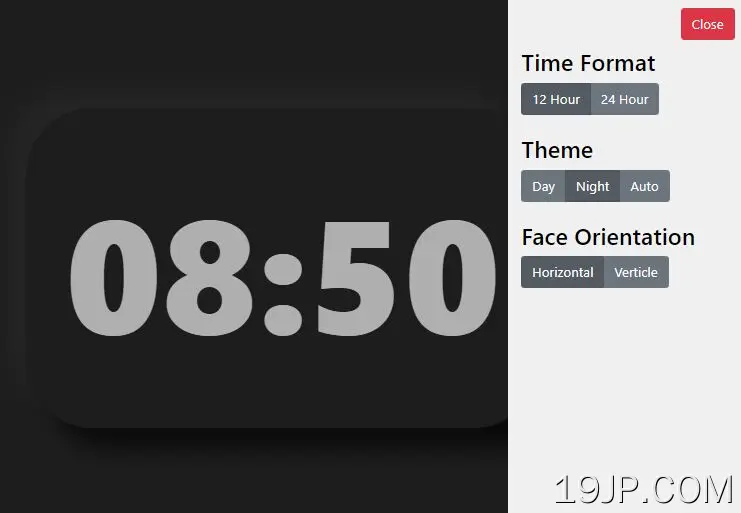
您的网站或应用程序需要数字时钟吗?在这篇博客文章中,我们将向您展示如何使用JavaScript创建自定义数字时钟,您可以根据自己的喜好进行配置。
我们将引导您完成代码,让您了解这一切是如何工作的,然后就如何使用新时钟给出一些想法。因此,无论您是在寻找一种快速简便的方法,将数字时钟纳入您的下一个项目,还是只想了解更多关于JavaScript编程的信息,请继续阅读!
如何使用它:
1.为数字时钟创建HTML。
<section id="clockContainer" class="clockContainer-theme-day">
  <div id="clockTime" class="clockTime-theme-day">N/a</div>
</section>
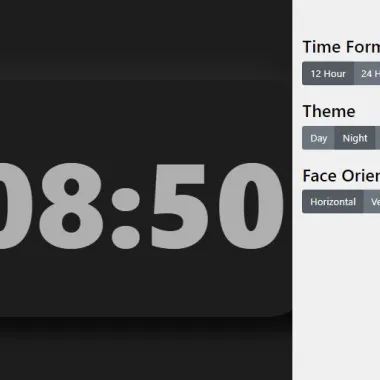
2.为时钟控制面板创建HTML,您可以在其中设置时间格式(12小时或24小时)、主题(亮、暗或自动)和面部方向(垂直或水平)。
<button id="btnAdjustOpen" type="button" class="btn btn-link">
  <span class="glyphicon glyphicon-cog" aria-hidden="true"></span>
  Adjustments
</button>
<section id="adjustmentContainer" class="adjustment-theme-day">
  <button id="btnAdjustClose" type="button" class="btn btn-danger" style="float:right;">Close</button>
  <br><br>
  <h3>Time Format</h3>
  <div id="btnGroupTimeFormat" class="btn-group btn-group-toggle" data-toggle="buttons">
    <label class="btn btn-secondary active">
      <input type="radio" name="options" id="option1" autocomplete="off"> 12 Hour
    </label>
    <label class="btn btn-secondary">
      <input type="radio" name="options" id="option2" autocomplete="off"> 24 Hour
    </label>
  </div>
  <br><br>
  <h3>Theme</h3>
  <div id="btnGroupTheme" class="btn-group btn-group-toggle" data-toggle="buttons">

    <label class="btn btn-secondary active">
      <input type="radio" name="options" id="option1" autocomplete="off"> Day
    </label>
    <label class="btn btn-secondary">
      <input type="radio" name="options" id="option2" autocomplete="off"> Night
    </label>
    <label class="btn btn-secondary">
      <input type="radio" name="options" id="option3" autocomplete="off"> Auto
    </label>
  </div>
  <br><br>
  <h3>Face Orientation</h3>
  <div id="btnGroupOrientation" class="btn-group btn-group-toggle" data-toggle="buttons">
    <label class="btn btn-secondary active">
      <input type="radio" name="options" id="option1" autocomplete="off"> Horizontal
    </label>
    <label class="btn btn-secondary">
      <input type="radio" name="options" id="option2" autocomplete="off"> Verticle
    </label>
  </div>
</section>
3.数字时钟的主要CSS样式。
#clockContainer {
  width: fit-content;
  margin: 0 auto;
  margin-top: 8.5rem;
  padding: 3rem;
  border-radius: 80px;
}

#clockTime {
  font-size: 12rem;
  font-weight: 900;
  font-family: -apple-system, BlinkMacSystemFont, 'Segoe UI', Roboto, Oxygen, Ubuntu, Cantarell, 'Open Sans', 'Helvetica Neue', sans-serif;
}

/* The button to open the adjustment container */
#btnAdjustOpen{
  position: fixed;
  top: 0;
  right: 0;
  margin: 16px;
}

/* The adjustment container */
#adjustmentContainer {
  display: inline-block;
  position: fixed;
  width: 18rem;
  height: 100vh;
  margin-right: -18rem;
  padding: 16px;
  right: 0;
  top: 0;
  color: #fff;
}
4.白天/晚上主题的CSS样式。
/* Day theme colors */
.body-theme-day {
  background-color: rgb(240, 240, 240);
}

.clockContainer-theme-day {
  box-shadow: 25px 25px 25px #FFFFFF,
             -25px -25px 25px #dbdbdb;
}

.clockTime-theme-day {
  color: #000;
}

.adjustment-theme-day {
  background-color: rgb(29, 29, 29);
  box-shadow: 0px -1rem 15px rgb(29, 29, 29);
}

/* Night theme colors */
.body-theme-night {
  background-color: rgb(29, 29, 29);
}

.clockContainer-theme-night {
  box-shadow: 25px 25px 25px #0a0a0a,
             -25px -25px 25px #242424;
}

.clockTime-theme-night {
  color: rgb(175, 175, 175);
}

.adjustment-theme-night {
  background-color: rgb(240, 240, 240);
}

.adjustment-theme-night > h3 {
  color: #000;
}
5.通过将主题CSS类添加到body标记来设置初始主题。
<body class="body-theme-day">
  ...
</body>

<!-- OR -->
<body class="body-theme-night">
  ...
</body>
6.在文档中加载必要的jQuery库。
<script src="/path/to/cdn/jquery.min.js"></script>
7.数字时钟的主要功能。
// Provides a simple clock with built-in DOM manipulation
// Set the time of the clock
function updateClockTick() {
  var $clockComponent = $("#clockTime");

  var mDate = new Date();

  var hour = mDate.getHours();
  var minute = mDate.getMinutes();
  var second = mDate.getSeconds();

  // Adjustments made by script.adjustment.js
  // By default it is military time
  //
  if (currentClockSetting == ADJUSTMENT_CLOCK_USE_12_HOUR) {
    if (hour > 12) {
      hour -= 12;
    }
  }

  // Adjustments made by script.adjustment.js
  // apply a <br> to create a horitonztal or verticle clock face
  if (currentOrientationSetting == ADJUSTMENT_ORIENTATION_HORIZONTAL) {
    // Remove padding by clock when horizontal
    $clockComponent.parent().css("marginTop", "");

    $clockComponent.text(zeroPad(hour) + ":" + zeroPad(minute));
  } else if (currentOrientationSetting == ADJUSTMENT_ORIENTATION_VERTICAL) {
    // Add padding by clock when vertical
    $clockComponent.parent().css("marginTop", "1.5rem");

    $clockComponent.html(zeroPad(hour) + "<br>" + zeroPad(minute));
  }
}

// Thanks for the slice idea https://stackoverflow.com/questions/18889548/javascript-change-gethours-to-2-digit
// Add leading zeros to numbers,
// returns a string
function zeroPad(num) {
  return ("0" + num).slice(-2);
}
8.以下脚本负责根据用户的喜好动态调整页面内容
// This script is responsible for adjusting the page content dynamically
// based on what the user prefered
const ADJUSTMENT_CLOCK_USE_12_HOUR = 0;
const ADJUSTMENT_CLOCK_USE_24_HOUR = 1;
var currentClockSetting = 0;

const THEME_DAY = 0;
const THEME_NIGHT = 1;
const THEME_AUTO = 2;

var currentThemeSetting = 0;
var watchTheme = window.matchMedia("(prefers-color-scheme: dark)");

const ADJUSTMENT_ORIENTATION_HORIZONTAL = 0;
const ADJUSTMENT_ORIENTATION_VERTICAL = 1;
var currentOrientationSetting = ADJUSTMENT_ORIENTATION_HORIZONTAL;

// Initiator of this script
function pageIsReady() {

  // Buttons
  var $btnAdjust = $("#btnAdjustOpen");
  var $btnAdjustClose = $("#btnAdjustClose");
  var $adjustContainer = $("#adjustmentContainer");

  $btnAdjust.click(function() {
    // Show the adjustment pane & hide this button
    $btnAdjust.hide();

    $adjustContainer.animate({
      right: "18rem"
    }, 200, "swing");
  });

  $btnAdjustClose.click(function() {
    // Hide the adjustment pane & show this button
    $btnAdjust.show();

    $adjustContainer.animate({
      right: 0
    }, 200, "swing");

  });

  // Add click listeners to each radio input. And when clicked,
  // update the corresponding option with an int value based
  // on the button index. (Taking a look at the UI will help)
  var $inputGroupTime = $("#btnGroupTimeFormat > label > input");
  // For each option in the radio group
  $inputGroupTime.each(function(index, e) {
    // Add a click listener. Set the
    // adjustment value equal to
    // the index
    // TODO: Kind of makes the CONST variable useless
    // in a sort of way
    var thisElement = $(e);

    $(e).click(function() {
      currentClockSetting = index;

      // Remove the css highlight on any of the elements
      $inputGroupTime.parent().removeClass("active");

      // Highlight this element
      thisElement.parent().addClass("active");
    });
  });

  // Find the radio group
  var $inputGroupTheme = $("#btnGroupTheme > label > input");
    // For each option in the radio group
    $inputGroupTheme.each(function(index, e) {
      // Add a click listener. Set the
      // adjustment value equal to
      // the index
      // TODO: Kind of makes the CONST variable useless
      // in a sort of way
      var thisElement = $(e);

      $(e).click(function() {

        if (currentThemeSetting != index) {
          currentThemeSetting = index;

          // Remove the css highlight on any of the elements
          $inputGroupTheme.parent().removeClass("active");

          // Highlight this element
          thisElement.parent().addClass("active");

          // Updates the UI to a dark or light theme
          themeOptions(index);
        }

      });
    });

  // Find the radio group
  var $inputGroupOrientation = $("#btnGroupOrientation > label > input");
    // For each option in the radio group
    $inputGroupOrientation.each(function(index, e) {
      // Add a click listener. Set the
      // adjustment value equal to
      // the index
      // TODO: Kind of makes the CONST variable useless
      // in a sort of way
      var thisElement = $(e);

      $(e).click(function() {
        currentOrientationSetting = index;

        // Remove the css highlight on any of the elements
        $inputGroupOrientation.parent().removeClass("active");

        // Highlight this element
        thisElement.parent().addClass("active");

      });
    });

}

function themeOptions(selectedIndex){

  if (selectedIndex == THEME_DAY) {
    watchTheme.removeEventListener("change", windowThemeChanged);
    applyTheme("day");
  } else if (selectedIndex == THEME_NIGHT) {
    watchTheme.removeEventListener("change", windowThemeChanged);
    applyTheme("night");
  } else if (selectedIndex == THEME_AUTO) {
    // Register an event listener.
    // Call an event when the host system's theme changes
    windowThemeChanged(watchTheme);
    watchTheme.addEventListener("change", windowThemeChanged);
  }

}

// Called when the host system theme is changed
function windowThemeChanged(e){
  const newTheme = e.matches ? "dark" : "light";
  if (newTheme == "dark") {
    applyTheme("night");
  } else if (newTheme == "light") {
    applyTheme("day");
  }

}

// Applies a "day" or "night" theme to the website
// based on the input string
function applyTheme(themeString){
    // Grab all the elements that require changing
    // remove the classes and then add the classes with the specified
    // "day" or "night" string
    $("body").removeClass().addClass("body-theme-" + themeString);
    $("#clockContainer").removeClass().addClass("clockContainer-theme-" + themeString);
    $("#clockTime").removeClass().addClass("clockTime-theme-" + themeString);
    $("#adjustmentContainer").removeClass().addClass("adjustment-theme-" + themeString);
}
9.启用数字时钟。
$(document).ready(function() {

  // Once this script is loaded, call the other clock
  // script that the DOM can be manipulated
  pageIsReady();

  // Create a repeatable ticker object which calls upon
  // other objects
  var interval = setInterval(function() {
    // Call tick function
    updateClockTick();
  }, 1000);

});
预览截图
 jQuery构建现代可定制数字时钟